
Rion's Taskbar Mine
体験版あり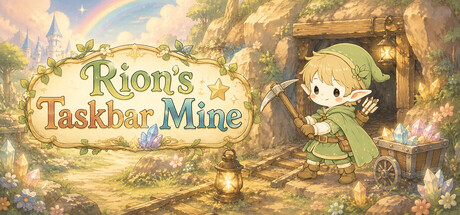


About the game
Rion's Taskbar Mineは、あなたのタスクバーのすぐ上で楽しめる、のんびりとした放置ゲームです。 あなたが仕事や勉強、PC作業をしている間、リオンも隣で鉱石を掘り、通貨「メルン」を稼いでくれます。 メルヘンでかわいい世界の中で、リオンと一緒に働いて、一緒に休んで、どれだけ稼げるか挑戦しましょう!
Steamの原文説明
This is a laid-back idle game you can enjoy right above your desktop taskbar.
While you’re working, studying, watching videos, or just going about your usual routine on your PC, a little elf miner named “Rion” will be digging for ore in the corner of your desktop and earning “Meln” for you.
There are no complicated controls. Just decide whether to “put Rion to work” or “let him rest.”
Enjoy a little day with Rion as your companion while you work on your PC.
Work and Earn Meln
When you ask Rion to work, he’ll grab his pickaxe and start mining ore.
Watch Rion work hard—clang, clang—and enjoy seeing your Meln balance grow little by little.
If he works efficiently, earning 1,000,000 Meln in a single day isn’t just a dream!
You can use the Meln you earn to purchase backgrounds. Try changing up the atmosphere of the place where he works.
(Tools and outfits are planned for future updates!)
How much can you earn today?
Be careful not to overwork him
Rion can’t keep working forever.
The longer he works, the more fatigue builds up, and his efficiency gradually drops.
When he starts to get tired, stop the work and let him take a break.
Work while he’s energetic and rest when he’s tired.
It’s up to you to decide when to have him work and when to let him rest.
A little work buddy on your desktop
Rion doesn’t just silently mine ore.
“Let’s do our best together today!”
“How’s that task going over there?”
“I’m starting to get a little tired…”
He’ll chat with you while you work, cheer you on, or even complain when he’s tired…
While you’re at your computer, Rion will be right there with you in the corner of your desktop.
Why not add a little life with a tiny elf miner to your daily routine?
Key Settings / Control Settings
Esc: Quit Game
F9: Change Language (English / Japanese)
体験版と発売について
前回の確認時にSteamの体験版が見つかりました。ダウンロードする前に、お住まいの地域で引き続き利用できるかSteamで確認してください。
情報・画像:Steam · 最終確認 UTC